How to make a birthday magazine on Canva
Short answer: To make a birthday magazine on Canva, create a portrait design at your print size (A4, US Letter or a half-size booklet page) and add one page for each magazine page, starting from a magazine template if you like. Replace the photos and text, keep words away from the edges, then download a print-quality PDF.
Canva and other design apps let you create your own page layouts or adapt a magazine template for a birthday. These steps cover planning the pages, adding photos and words, and printing a booklet. Menus change often, so we describe what to do rather than which button to press.
Before you start: choose the page size
Decide how you’ll print before you design, because changing the size later can scramble a layout. Design at the size of the finished page:
| How you’ll print it | Design size | Notes |
|---|---|---|
| Full pages on US Letter | 8.5 × 11 in, portrait | Print single- or double-sided, then staple or tie |
| Full pages on A4 | 210 × 297 mm, portrait | The standard paper outside North America |
| Folded booklet on US Letter | 5.5 × 8.5 in, portrait | Two pages print on each side of a sheet |
| Folded booklet on A4 | 148 × 210 mm (A5), portrait | Two pages print on each side of a sheet |
| Digital only | A4 or US Letter, portrait | Reads well on a phone or computer |
Step by step
-
Create a design at your page size
Start a new design with custom dimensions — the size from the table above — in portrait. If the app can show margins or a bleed area, turn that on so you can see where it gets risky near the edges.
-
Start from a template, or from scratch
Search the app’s templates for a magazine or magazine cover layout, and pick one with big photos and clear headlines. Check whether any elements belong to a paid plan before you build around them.
-
Add a page for each magazine page
Plan the pages first — for example: cover, letter from the editor, timeline, reasons we love you, interview, photo gallery, quiz and a back cover of wishes. Duplicate a finished page to start the next one, so fonts, colors and margins stay consistent.
-
Swap in your photos
Drop photos into the template’s photo frames so they crop to fit, then drag to position faces. Use original photos, not screenshots, and save your best portrait for the cover.
-
Replace the text
Write the masthead, cover lines and every page in your own words. Stick to two fonts, keep body text around 10–12 pt so it’s readable in print, and keep text off the busiest parts of photos.
-
Check before you export
Keep text and faces at least 6 mm (¼ in) from every edge, count your pages (a multiple of four for a booklet), and proofread names, dates and ages. Reading it on a phone screen at full size catches typos.
-
Download a print-quality PDF
Export all pages as a PDF, choosing the option meant for printing rather than the smaller, screen-quality one. For home printing, leave crop marks and bleed off — a home printer can’t trim them away.
How to print a Canva magazine at home
Design apps usually export pages one after another, in reading order. That’s perfect for full pages, but a folded booklet needs its pages rearranged so they come out in the right order after folding.
Full pages
- Open the PDF and print at 100% / Actual size on the paper size you designed for.
- Print single-sided, or double-sided flipping on the long edge.
- Bind it with a corner staple, a ribbon or a washi-tape spine — see how to bind a magazine at home.
Folded booklet
- Open the PDF in a PDF reader that has a booklet print option. It places two pages on each side of the sheet, in folding order.
- Choose two-sided printing and flip on the short edge.
- If you designed at full size (A4 or Letter), the booklet setting shrinks each page to half size, so check the text is still big enough to read.
- Stack the sheets, fold, crease and staple — see how to fold a booklet.
Our printing guide covers the best paper, printing from a phone and printers that can’t print double-sided.
Canva or a guided template?
We operate Oolshak. This comparison describes the providers’ public product and help pages reviewed on 12 October 2026, alongside Oolshak’s current features. Independent competitor account, download and phone tests, comparative timings and rankings have not been performed. The approaches below may suit different projects:
| Canva design editor | Oolshak guided template | |
|---|---|---|
| Starting point | A blank design or editable magazine and cover templates, including birthday options | Eight finished birthday pages, or a 4-page short issue |
| What you change | Layout, fonts, colors, images and text in your chosen design | Words and up to 12 photos in guided fields; fixed layouts with PDF export |
| Styles | A published library of editable designs; free and premium options vary by template | Nine EN styles: Confetti, Space, Glam, Gold, Dino, Unicorn, Sports, Halloween and Aesthetic |
| Writing help | Templates can include editable example text; replace it with your own birthday story | Editions by age and by person start you off with fitting titles and questions |
| Layout work | Choose or adapt the page layouts alongside your writing | Choose a fixed style, then fill in the page prompts |
| Booklet printing | Export the pages, then use a booklet print setting | Download a ready-to-fold booklet PDF, or single pages |
| Cost | Free design options; premium assets may require payment or an eligible plan for unwatermarked output | Free creation, preview and PDF; sign in with Google to download |
| May suit you if | You enjoy designing and want control over each page layout | You prefer guided birthday pages with fixed layouts |
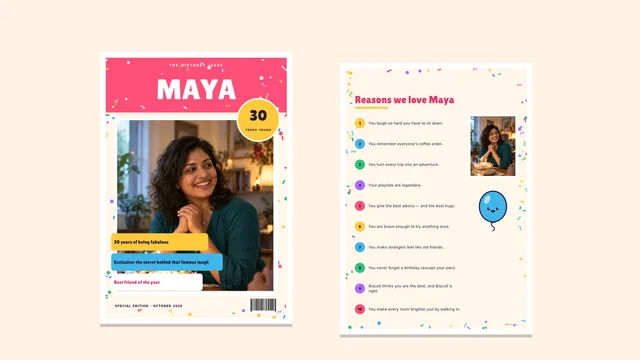
If you prefer guided pages, see the finished fictional four-page birthday gift and its making steps. The example shows a personalised cover and a friend’s memory on the wishes page. The four-page format contains a cover, reasons, photo gallery and wishes. It is an illustration, not a customer gift or a physical print test.
Make the whole gift yourself, or follow the optional adult friend-note workflow shown there: save after Google sign-in, collect short notes with a seven-day contribution link and review up to six for the wishes page. Add your own words and permitted photos, preview each selected page and check names before downloading. Send your completed PDF privately, or print one test sheet before making the booklet.
Official Canva resources and two alternatives
Use Canva’s own resources to check the design and output you want before filling every page:
- Canva’s magazine-cover maker guide explains its editor, photo uploads, collaboration and PDF output.
- Canva’s magazine-cover template gallery shows editable starting points, including birthday and wedding designs. Check the individual design’s free or premium elements.
- Canva’s personal-printer help explains PDF Print and printing from its mobile app. The direct printer command is unavailable on mobile web; PDF download is an alternative.
- Canva’s premium-element help explains watermarked drafts and the licensing or eligible-plan conditions for premium assets.
Jilster: its magazine maker describes co-makers submitting pages for an organiser to review and recommends starting on a desktop or laptop. Its product page describes a free maker, online pageflip and individual 72-dpi page downloads. A complete PDF is described as an order; its full-PDF fee and conditions remain unknown from the documentation reviewed. Check those conditions before choosing it for a self-printed gift.
Docs & Slides: the Birthday Magazine Template advertises free personal and business use with required attribution, Google Docs or Word editing, and instructions to open the template and make a copy. It may suit someone comfortable editing a document; that is an inference from its published format. We did not copy the file, verify its dimensions or export it.
A quick checklist before you commit
- Complete-output cost: check the whole PDF, resolution, watermark and premium-asset conditions, and separate any printing or shipping charge from the design tool.
- Account and copying steps: check the sign-up, Google sign-in or template-copy requirements before adding personal photos.
- Permission and attribution: use photos and stories with permission, and keep any template credit or licence condition required by the provider.
- Phone suitability and layout control: try replacing a photo and editing a paragraph on the device you will use. Decide whether you want fixed guided pages, a flexible design editor or a document layout.
- Print fit: confirm the actual paper dimensions, page order, text size and booklet settings. Print one test sheet before making the complete gift.
Tips for a magazine that looks professional
- One grid on every page. Use the same margins and column widths throughout; consistency is what makes it look like a real magazine.
- Two fonts, one accent color. A display font for headlines, a plain one for text, and one color repeated on every page.
- Fewer, bigger photos. One large photo beats six tiny ones. Save the collage for the gallery page.
- Real magazine details. Page numbers, a footer with the magazine’s name, pull quotes and photo captions all add realism.
- Strong contrast. Dark text on a light background, or the reverse — never text over the busiest part of a photo.
- A cover that sells it. Spend the most time here: see how to make a birthday magazine cover for masthead and cover-line tips, and our birthday magazine ideas for what to write inside.